Most podcast gear guides are written by people trying to sell you gear. This one is not. We run three professional podcast studios, and every week we watch people walk in with bags of equipment they did not need and skip the one or two things that actually mattered. So here is the straight version of what equipment you need for a podcast, what you can skip, and where your money actually makes a difference.
THE SHORT ANSWER: WHAT YOU ACTUALLY NEED FOR A PODCAST
To start a podcast you need five things: a microphone, a pair of wired podcast headphones, a recording device (usually the computer you already own), recording software, and a quiet room. That is the real list. Everything else on this page is an upgrade, not a requirement. You can be recording quality audio this week for under $150.
Notice what is not on that list. You do not need a mixer. You do not need a fancy audio interface. You do not need studio foam on every wall. Those things help in specific cases, and we will cover when, but none of them stand between you and your first episode. The people who never launch are almost always the ones who convinced themselves they needed all of it first.
Here is how the rest of this guide is built. We go piece by piece through the recording equipment that matters, in rough order of importance, then we hand you three complete kits at three budgets so you can just copy one.
HOW MUCH DOES PODCAST EQUIPMENT COST?
A realistic podcast budget falls into three tiers:
- Starter (about $100 to $200): one good USB mic, wired headphones, free software, and your existing computer. This is enough to sound genuinely professional for a solo show.
- Serious (about $400 to $900): a better dynamic mic or two, a boom arm, an audio interface, decent monitoring headphones, and basic acoustic treatment.
- Pro (about $1,500 and up): multiple XLR microphones, a podcast mixer or multi-input interface, cameras and lighting for video, and a treated room.
The single most common money mistake we see is spending at the pro tier before you have published ten episodes. Buy at the starter tier, learn what your show actually needs, then upgrade the pieces that are holding you back. Gear does not make a podcast good. Showing up consistently does.
PODCAST MICROPHONES: THE ONE THING THAT MATTERS MOST
If you spend real attention on one purchase, make it the mic. Your microphone is responsible for maybe 80 percent of how professional you sound. Listeners forgive a lot, but they will not forgive audio that is hard to listen to. Bad audio is the number one reason people click away from a new show.
There are two ways a mic connects, and one big choice underneath that.
USB MICROPHONES
A USB mic plugs straight into your computer and works instantly. No extra hardware, no setup headaches. The recording device is built right into the mic. For solo podcasters and most beginners, a USB microphone is the correct answer, full stop. In 2026, look for USB-C rather than the older USB-A connector.
XLR MICROPHONES
An XLR mic uses a professional audio cable and needs something to plug into, either an interface or a mixer. XLR microphones are the move once you are recording two or more people in the same room, or when you want a specific preamp sound. The good news: many modern mics are hybrid and do both USB and XLR, so you can start simple and switch to XLR later without buying a new mic.
DYNAMIC VS CONDENSER: THE CHOICE THAT ACTUALLY MATTERS
This is the part the listicles gloss over, and it matters more than the brand on the box.
- A dynamic mic rejects background noise. Room echo, an air conditioner, keyboard clicks, a dog in the next room. It hears mostly your voice and ignores the rest.
- A condenser mic is more sensitive and captures more detail, but it also captures everything else in the room.
Here is the honest guidance we give every client: unless you are recording in a treated, genuinely quiet room, buy a dynamic mic. Most people record in a spare bedroom or a home office with hard floors and a humming laptop. In that room, a dynamic mic sounds noticeably better in practice, even if a condenser looks better on a spec sheet.
OUR ACTUAL MIC PICKS
We are not going to list twenty options. Here is what we would tell a friend:
- Best value, start here: the Samson Q2U, around $70. It is dynamic, it does both USB and XLR, and it comes with a stand and cable. It has powered more starter podcasts than almost any other mic for good reason.
- Best all-around upgrade: the Shure MV7+, around $180. Dynamic, USB-C and XLR, forgiving in imperfect rooms, and it looks good on camera.
- The famous one: the Shure SM7B is the mic Joe Rogan uses. It sounds fantastic, but it is expensive, needs an interface with strong gain, and is overkill for a new show.
- The one to think twice about: the Blue Yeti is the most popular mic among podcasters, but it is a condenser. In a normal untreated room it picks up every sound around you. If you already own one, use it close and in a quiet space. If you are buying new, a dynamic mic in the same price range will usually sound cleaner.
MICROPHONE ACCESSORIES YOU ACTUALLY NEED
A mic alone is fine, but three small pieces of recording equipment make a real difference and cost very little:
- Pop filter: a small screen that sits in front of the mic and softens the hard puffs of air on P and B sounds. Cheap, and it fixes a problem that otherwise ruins takes.
- Boom arm: clamps to your desk and holds the mic at mouth height so you are not hunched over. It also keeps desk bumps out of your recording. This is the accessory people skip and later wish they had bought first.
- Shock mount: holds the mic in a cradle so vibrations from the desk do not travel into your audio.
That is the whole accessory list for podcasting starting out. You do not need anything fancier yet.
PODCAST HEADPHONES: DO NOT SKIP THESE
Podcast headphones are not optional, and this is the piece beginners most often try to save money on. You wear headphones while recording so you can hear exactly what the mic is capturing, in real time. Without them you are recording blind. You will not catch the plosives, the background hum, or the moment your gain was set wrong until it is too late to fix.
Use wired headphones, not wireless. Wireless adds delay that makes monitoring your own voice feel off. Any closed-back wired pair works to start. A basic set of wired earbuds is better than no monitoring at all. You will also use the same headphones to edit later, so they earn their keep twice.
YOUR RECORDING DEVICE
For most people the recording device is the computer you already own. A laptop from the last several years has plenty of power to handle podcast recording and editing. You do not need a new machine to start.
Two other paths exist. A portable digital recorder (like a Zoom handheld) lets you record without a computer, which is handy for interviews out in the field. And a phone or tablet can record in a pinch, though the quality ceiling is lower. Start with your computer. Add a recorder only if you record on location.
AUDIO INTERFACE OR PODCAST MIXER?
This is where people overspend. Short version: if you use a USB mic, you need neither. The mic already does the job of an interface. You only need one of these once you move to XLR.
AUDIO INTERFACE
An audio interface is a small box that connects XLR mics to your computer and adds cleaner preamps. A two-input interface like the Focusrite Scarlett line is the standard starting point for one or two XLR mics. If you are running a single XLR mic and want better sound, this is the simplest step up.
PODCAST MIXER
A podcast mixer does more: it lets you control several mics, add sound effects on the fly, and manage remote callers. A unit like a RODECaster is popular for shows with a live, multi-mic feel. A mixer is genuinely useful for a roundtable show with three or four hosts. It is a waste of money for a solo show.
The rule: inputs drive the decision. One or two people, get an interface or just use USB mics. Three or more people in one room, a mixer starts to earn its place.
RECORDING SOFTWARE
Your recording software is where the audio lands and gets edited. The good news is that the best starting options are free.
- Free and solid: Audacity (works everywhere) and GarageBand (Mac). Both handle recording and editing fine for a new show.
- For remote guests: a browser platform that records each person locally, so a guest's bad internet does not wreck the audio. This is the modern way to record interviews with people who are not in the room.
- Paid, later: more advanced editors add cleanup tools and multi-track features, but you do not need them on day one.
Do not let software be the thing that stalls you. Pick a free option, learn the basics of cutting and leveling, and improve from there.
VIDEO PODCAST EQUIPMENT
More shows record video now, because clips are how most podcasts get discovered. If you want video, add three things to your kit:
- A camera: a decent webcam is a fine start. A mirrorless camera looks far better once you are ready.
- Lighting: this matters more than the camera. A simple key light aimed at your face beats an expensive camera in a dark room.
- A tripod or stand: to hold the camera steady at eye level.
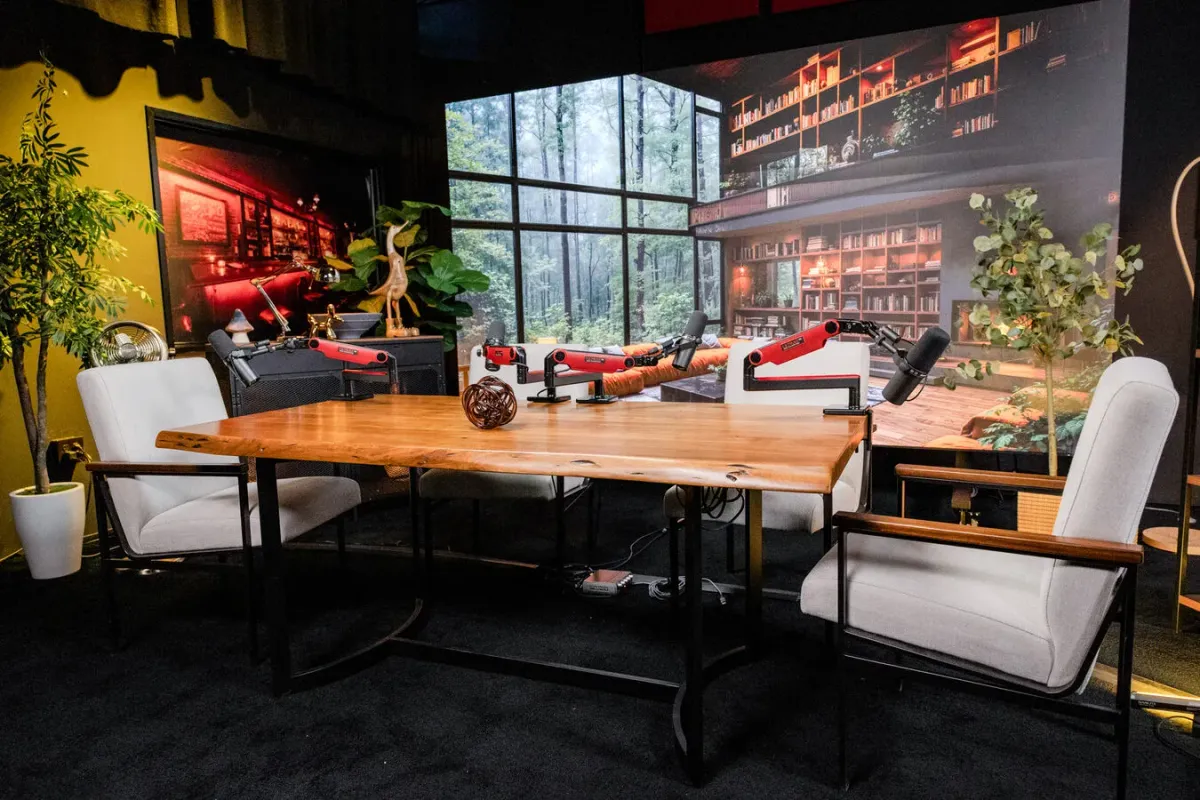
Video multiplies your gear list and your editing time. If you are new, launch audio first, get comfortable, then add video once the show has legs. Video is also the point where many people decide a studio is worth it, because lighting and multi-camera setups are a lot to manage at home.
ACOUSTIC TREATMENT: THE UPGRADE MOST PEOPLE SKIP
Here is a secret that saves money: the room matters as much as the mic. A great mic in an echoey room still sounds like a bad recording. The cheapest quality upgrade in podcasting is not gear at all, it is where and how you record.
- Record in a smaller room with soft stuff in it. Carpet, a couch, curtains, and clothes all absorb echo.
- A closet full of hanging clothes is a genuinely great sounding space. We are not joking.
- Real acoustic panels help, but a blanket-fort-quality room gets you most of the way for free.
- Keep the mic close to your mouth, about a fist away. Close mic technique beats almost any treatment.
Fix the room before you buy a better mic. It is free and it works.
THREE SAMPLE SETUPS BY BUDGET
Here are three complete kits. Pick the one that matches your budget and stop researching.
THE STARTER KIT (ABOUT $150)
- Samson Q2U dynamic mic (USB)
- Wired headphones you probably already own
- A cheap pop filter
- Audacity or GarageBand (free)
- Your existing computer, in a quiet, soft room
This setup sounds professional for a solo or two-person show. Plenty of ranked podcasts run on exactly this.
THE SERIOUS HOME KIT (ABOUT $600)
- Shure MV7+ dynamic mic
- A boom arm and shock mount
- Closed-back monitoring headphones
- A small audio interface if you go XLR
- A couple of acoustic panels or a well-chosen soft room
This is the sweet spot for someone committed to the show and recording regularly.
THE PRO OR STUDIO-GRADE SETUP (ABOUT $2,000 AND UP)
- Two or more XLR microphones (SM7B or similar)
- A podcast mixer or multi-input interface
- Cameras and lighting for video
- A properly treated room
- More editing time and technical know-how
This is a real investment of money and time. Which brings us to the honest question most gear guides never ask.
WHEN TO STOP BUYING GEAR AND JUST BOOK A STUDIO
We sell studio time, so take this with that in mind, but the math is the math. A pro-level home setup runs a couple thousand dollars in gear, plus the hours you spend learning lighting, acoustics, multi-camera switching, and editing. For a lot of people, especially businesses and anyone doing video, that time and money is better spent booking a studio that already has all of it dialed in.
A studio makes sense when you want multi-camera video without becoming a video engineer, when you record guests and want them to walk into something impressive, when your room simply will not sound good no matter what, or when your time is worth more than the learning curve. A home setup makes sense when you record solo, on your own schedule, and enjoy the tinkering.
There is no wrong answer. Some of our regulars record at home for quick solo episodes and book a studio for their big guest interviews. If you are weighing it, our podcast studio vs home recording breakdown lays out the real tradeoffs, and our studio cost guide shows what booking actually runs.
COMMON MISTAKES WE SEE
After years of watching people set up, the same avoidable errors come up again and again:
- Buying a condenser mic for an untreated room. The Blue Yeti trap. A dynamic mic solves it.
- Skipping headphones. You cannot fix problems you cannot hear.
- Buying a mixer for a solo show. You are paying for inputs you will never use.
- Ignoring the room. People spend on a great mic and record in a tile bathroom.
- Buying everything before episode one. Gear is not the bottleneck. Publishing is.
- Chasing the mic a famous host uses. The Shure SM7B is great and wrong for most beginners.
Spend less than you think you need, get recording, and let the show tell you what to upgrade.
FREQUENTLY ASKED QUESTIONS
HOW DOES A BEGINNER START A PODCAST?
Pick a topic and format, get one USB dynamic mic and wired headphones, record in a small soft room using free software, and publish your first episode to a podcast host. Start simple and upgrade later. The gear is the easy part.
HOW MUCH DOES A FULL PODCAST SETUP COST?
A starter setup costs about $100 to $200 and sounds professional. A serious home setup runs $400 to $900. A pro or studio-grade rig with video is $1,500 and up. Most people should start at the low end.
DO I NEED AN LLC TO START A PODCAST?
No. You do not need an LLC or any business structure to record and publish a podcast. Some hosts form one later for tax or liability reasons once the show earns money, but it has nothing to do with the equipment or getting started.
CAN I START A PODCAST WITHOUT ANY EQUIPMENT?
Almost. At a minimum you need something to record with, and the phone in your pocket can do that. But a $70 dynamic mic and wired headphones is a night and day upgrade over a phone, and it is the cheapest quality jump you can make.
DO I NEED A MIXER OR AN AUDIO INTERFACE?
Only if you use XLR mics. A USB mic has the interface built in, so a solo USB setup needs neither. Add an audio interface for one or two XLR mics, and consider a podcast mixer only once you have three or more people in the room.
USB OR XLR MIC, WHICH SHOULD I CHOOSE?
Start with USB for simplicity. Choose XLR when you record multiple people on one computer or want a specific preamp. The smart buy is a hybrid mic that does both, so you can upgrade later without replacing the mic.
NOT SURE WHETHER TO BUILD A SETUP OR BOOK A STUDIO?
Come see what a full professional setup actually looks like in person. Book a free tour of Sin City Podcast Studios, walk through three sets, and talk to the team before you spend a dollar on gear.
BOOK YOUR FREE STUDIO TOUR